Phantom wallet
screenshot generator.
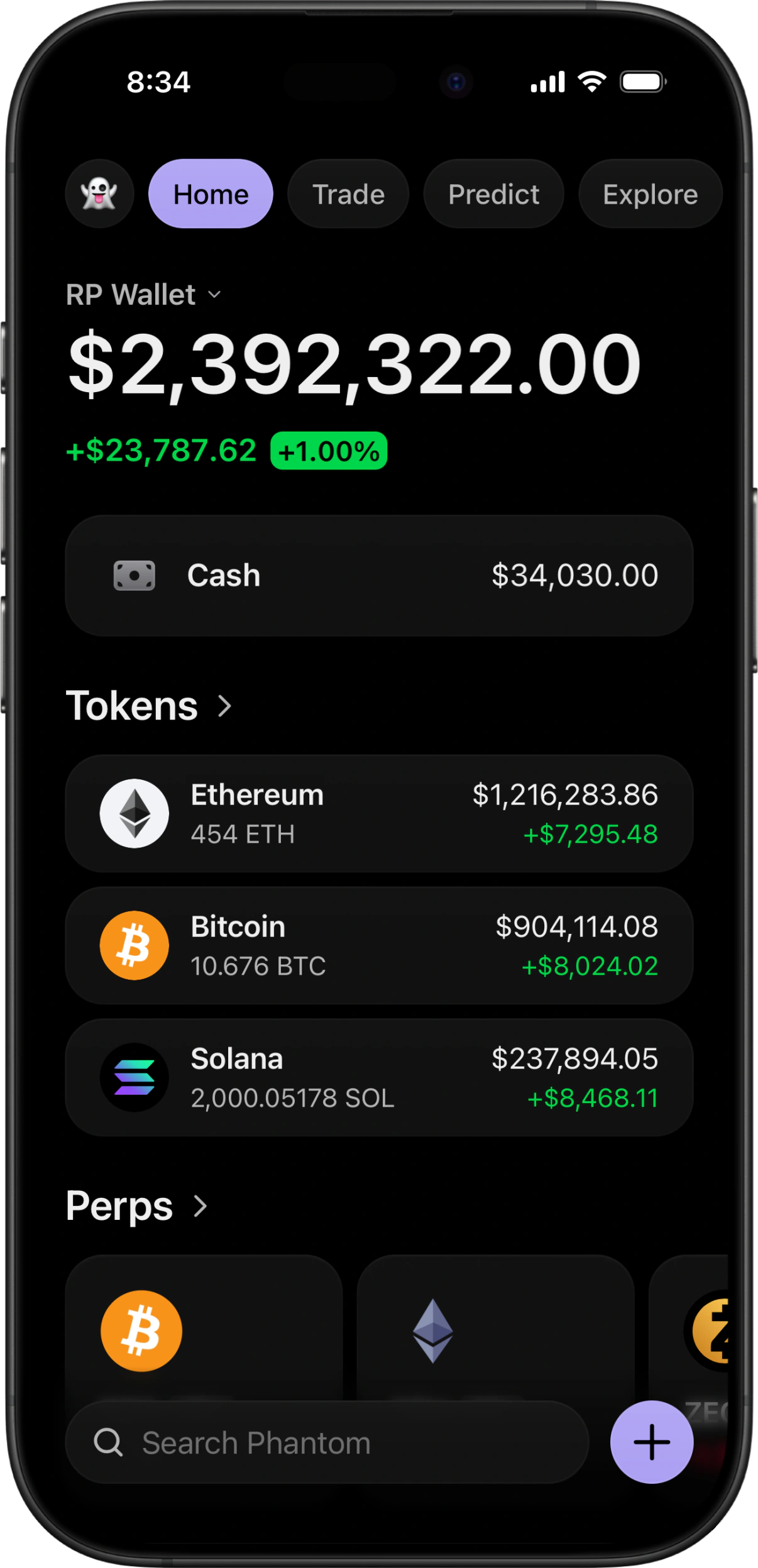
Take the portfolio screenshot on your phone, then tap a token for a close-up. Both shots use the holdings you set in the simulator and your phone’s own status bar and resolution.
RPWallet is independent and unaffiliated with Phantom. These novelty apps are simulations for content creation and larping only. Other uses are discouraged. Responsible use
Phantom features
Open the screen you need before pressing your phone’s screenshot buttons.
Home screen total
The headline balance and the token rows under it, valued at live prices from the quantities you set.
Token close-up
Tap a holding for its price chart and position. Scrub the line or candle chart to the moment you want frozen.
Position card
Share a single holding and its return on a position card, sized for a post or a story.
Activity detail
Every simulated send, receive and swap gets its own entry with a detail sheet you can open for the follow-up frame.
Hide a token
Take a token off Home for a cleaner shot. It stays in your holdings and comes back with one tap.
Your own phone’s frame
The capture comes from your device, so the clock, battery and screen proportions match every other screenshot you post.
Take screenshots on your own phone
Set up the fictional portfolio once in RPWallet. Use your phone’s screenshot buttons to capture Home, then tap a token to take a second shot of the same holding.
Both images use your phone’s resolution. The clock and battery icon come from the phone you used for the shoot.
How to make a Phantom wallet screenshot
Allow about five minutes for the first setup. On later shoots, start with the holdings in step 3.
- Install it on your home screen
After activating your pass, open the Phantom simulator from your RPWallet dashboard. On iPhone use Share, then Add to Home Screen in Safari. On Android, install it from the Chrome menu.
- Open it from the icon
Open the simulator from its new icon to keep the browser’s address bar out of the frame.
- Set the holdings
Tap the avatar, then Settings, then your profile card to reach Edit Profile. Enter the quantity for each token and tap Save.
- Arrange the home screen
Hide any token you do not want in the frame. It stays in your holdings, so you can show it again later.
- Take the two shots
Take the home screen shot. Then tap a token for its chart, or open an Activity entry, and capture that from the same portfolio.
Screens worth capturing
For a portfolio overview, start on Home. If the lesson follows a single coin, open its token detail screen.
- Home
- The total and the token list. Best when the post is about the overall portfolio.
- Token detail
- Price chart above the position. Line and candlestick views both respond to a finger, so you can hold the crosshair on a date.
- Position card
- One holding and its return on a shareable card. Useful when the post is about a single token.
- Activity entry
- Tap a simulated send, receive or swap to show its amounts in the detail sheet.
- Receive screen
- Choose the network you’re explaining to show its receive screen.
Keeping a set of screenshots consistent
Market prices can change between screenshots. Take adjoining shots within a minute or two and check the displayed value before you publish.
Keep a visible simulation label on each image, including crops. Never use a simulator screenshot as proof of funds.
More Phantom pages
- Phantom Wallet SimulatorSet balances, import tokens and open a practice swap in Activity.
- Try the Phantom balance demoEdit Bitcoin or cash and see the portfolio total change on the home screen.
- Fake Phantom WalletRun it from your phone’s home screen with nothing to download.
- Fake Phantom Wallet BalanceSet token quantities and let the total follow live prices.
- Phantom Memecoin SimulatorCustom tokens, sub-cent prices and the Trade tab’s trending list.
- Phantom Perps SimulatorLeverage, stop losses and liquidation with simulated USDC.
- Phantom LARP WalletPlan a Solana scene for a skit or roleplay video.
- Phantom Simulator on iPhoneInstall from Safari instead of looking for an IPA file.
- What Is a Phantom Wallet Simulator?Who uses one, and what it can and cannot do.
Included with every pass.
One license unlocks all nine LARP apps.
 LARP Fomo
 LARP Shopify
 LARP Coinbase
 LARP Revolut
 LARP Phantom
 LARP Trust Wallet
 LARP Exodus
 LARP Ledger Live
 LARP Cash App
- ✓ Full access on iOS or Android
- ✓ Custom balances, all screens and features included
- ✓ Priority support
Pricing
Every pass includes all wallets.
7-Day Pass
Short term access
- Full access on iOS or Android
- All apps included (Phantom, Trust, Exodus, Ledger, Coinbase, Fomo, Cash App and Banking App)
- Custom balances, all screens and features included
- 1 device
- Priority support
- Not included: Early access to new wallets
1-Month Pass
Full features unlocked
- Full access on iOS or Android
- All apps included (Phantom, Trust, Exodus, Ledger, Coinbase, Fomo, Cash App and Banking App)
- Custom balances, all screens and features included
- 1 device
- Priority support
- Not included: Early access to new wallets
1-Year Pass
Best value for power users
- Full access on iOS or Android
- All apps included (Phantom, Trust, Exodus, Ledger, Coinbase, Fomo, Cash App and Banking App)
- Custom balances, all screens and features included
- 2 devices
- Priority support
- Not included: Early access to new wallets
- Full access on iOS or Android
- All apps included (Phantom, Trust, Exodus, Ledger, Coinbase, Fomo, Cash App and Banking App)
- Custom balances, all screens and features included
- 3 devices
- Priority support
- Early access to new wallets
What our Telegram members say
Read more reviews in our Telegram channel.
Phantom is crazy close fr. The animations are working too
Telegram Member replied in like 30 seconds and sorted my key. w support
Telegram Member bro how are the animations this smooth wtf? feels like a real app
Telegram Member Key worked immediately, thanks g.
Telegram Member Damn this looks too clean, didn't expect trust to be 1:1 like this. u can use this as a vouch
Telegram Member u cooked on this update bro holy shit phantom and exodus are 1:1
Telegram Member fixed my issue in 2 mins bro, 10/10 support love u guys
Telegram Member like how does a web app feel 100% native with zero frame drops???
Telegram Member Yooo key activated smoothly. Everything works super clean, no issues at all thanks.
Telegram Member legit the only one in this whole telegram space that actually knows what hes doing
Telegram Member bro exodus is perfection holy shit ui is 1:1 down to the font
Telegram Member fast asf, paid and got access right away. appreciate it bro
Telegram Member u the goat bro, animations are butter smooth
Telegram Member The transaction history and balance animations are clean asf, just what I needed
Telegram Member support fast asf too answered my dm instantly
Telegram Member
How to get started.
Get your pass
Choose your pass length and device count at checkout.
Save your license key
Copy it from the payment page once payment is confirmed.
Activate and install
Enter the key in your dashboard. Install a wallet, then set your balance.

Frequently asked questions.
Phantom Screenshot Generator
How do I make a fake Phantom wallet screenshot?
Activate your pass, open the Phantom-style simulator from your dashboard and add it to your home screen. Set the holdings in Edit Profile, open the screen you want and use your phone’s screenshot buttons.
Is this a web generator that exports an image?
No. It is an interactive wallet on your phone and the screenshot is taken by your phone. That is why the status bar and resolution match your device, and why you can capture several screens from the same portfolio.
Can I screenshot a token chart instead of the home screen?
Yes. Tap any holding to open its chart and position. Line and candlestick charts both respond to a finger, so you can hold the crosshair on a point before capturing.
Will my screenshot have a watermark?
The wallet screens do not carry one. Label the image as a simulation wherever you post it. Our safety page explains the disclosure we ask for.
Can I take screenshots on Android?
Yes. Open the simulator in Chrome, install it from the browser menu and launch it from the icon so the browser bar stays out of the capture.
Is RPWallet affiliated with Phantom?
No. RPWallet is an independent simulation tool and is not affiliated with, endorsed by, or connected to Phantom or any other wallet provider or blockchain project. All product names and brands are the property of their respective owners.
Still have a question? Ask on Telegram