The #1 Ledger Live simulator
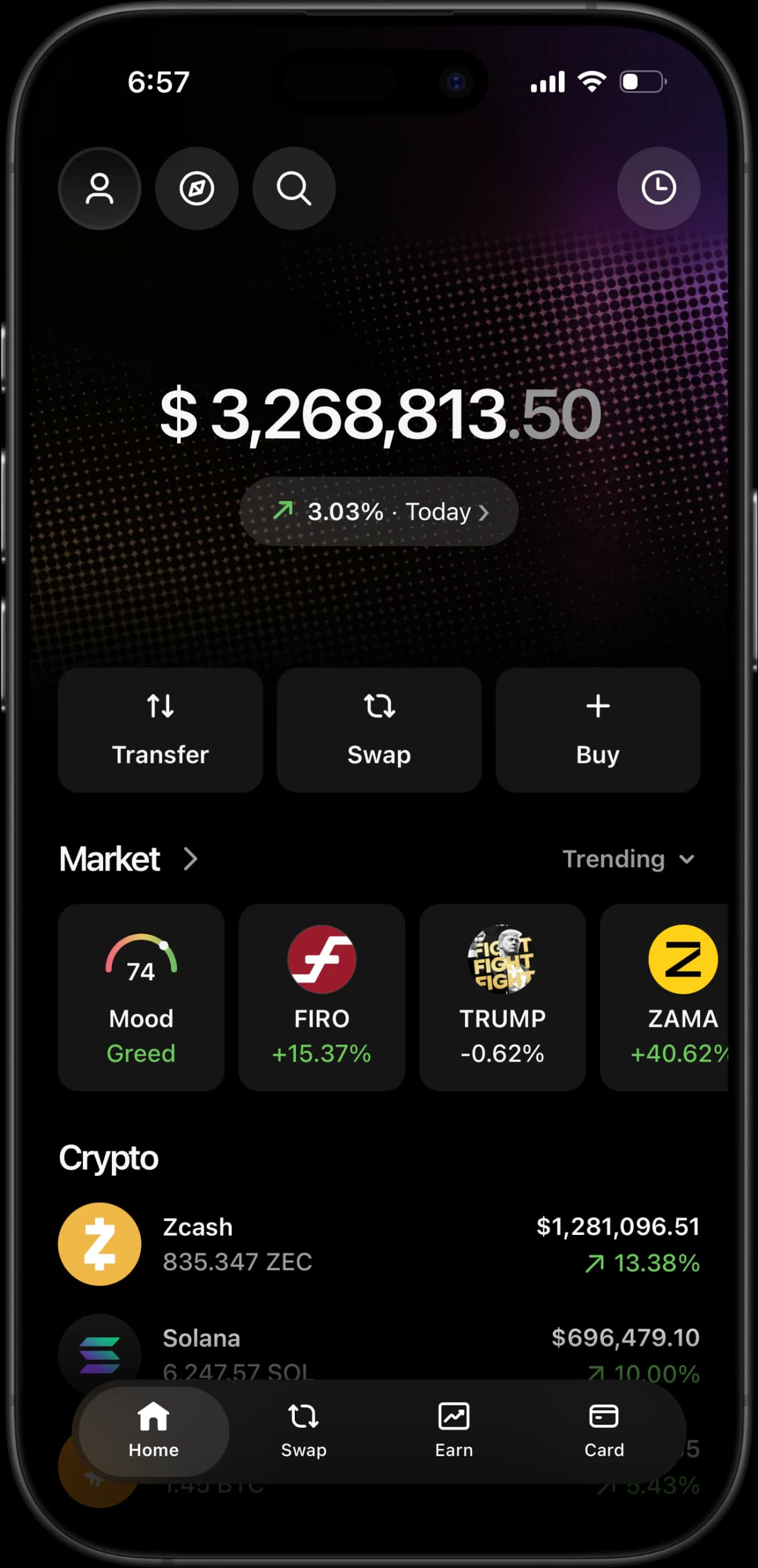
A pixel-perfect Ledger Live replica for iOS and Android, with the device manager included. Add a simulated Flex, Stax or Nano, install its blockchain apps, set any balance, and record cold-storage content — with no real crypto, no recovery phrase, and no hardware to buy.
Installing on iPhone?
Compare the Ledger Live IPA route with RPWallet’s Safari installation and get your simulator onto the Home Screen.
Ledger Live IPA alternativeEverything a Ledger Live simulator should do
The companion app and the device behind it, engineered for content and demos.
A device, not just a balance
My Ledger holds a real one: pick a Flex, Stax, Nano Gen5, Nano X, Nano S Plus, Nano S or Blue, name it, and it reports a firmware version and a genuine check the way the real manager does.
Install blockchain apps
Add Bitcoin, Ethereum, Solana, XRP, Cardano and the rest one at a time. Each carries its own version and size, and the storage bar fills as they go on.
Set any balance
Edit the portfolio total and any individual asset in seconds — Bitcoin, Ethereum, Solana, Zcash, stablecoins, and tokenised stocks like AAPLx, NVDAx and TSLAx.
Market, mood and charts
Trending, gainers, losers and favourites, a Fear & Greed mood gauge, and per-asset charts from one day out to all time — the screens a Ledger owner actually scrolls.
No recovery phrase, ever
There is no device to plug in and no phrase to type, because there is no chain behind the screens. Ledger owners are the most phished users in crypto; anything asking for 24 words is not a simulator.
Works on iPhone and Android
Runs from your mobile browser and adds to the home screen, launching full-screen with its own icon so nothing browser-shaped lands in shot. Android buyers can also pair the official RPWallet app from their dashboard.
How it works.
Step 01
Add your Ledger device
Open the profile from the home screen and tap Add new under Devices. Choose a model, name it, and it lists as “Available. Tap to connect”, exactly like a real one sitting nearby.
Step 02
Load the device and the portfolio
Install the blockchain apps your scene needs, then set balances across the assets behind them so the device and the portfolio tell the same story.
Step 03
Simulate and capture
Move through Market, Earn and the send flow, then screenshot or screen-record the result for your content.
Ledger Live simulator FAQ.
What is a Ledger Live simulator?
A Ledger Live simulator is a pixel-perfect copy of the Ledger Live interface that lets you set any balance, manage a simulated hardware device, and move through the app's real screens without touching crypto. RPWallet renders the same portfolio, Market, Earn, Card and My Ledger screens, so captures look authentic while nothing connects to a blockchain, a recovery phrase, or a physical device.
Does it connect to a real Ledger device?
No, and it cannot. There is no Bluetooth pairing, no cable, no recovery phrase entry, and no clipboard access, because the simulator has no chain to sign for. The device you add is a simulated one you configure yourself. This matters more here than on any other wallet: Ledger owners are the single most targeted group for recovery-phrase phishing, and any tool that asks for your 24 words is stealing from you, whatever it calls itself.
Which Ledger models can I show?
Seven, and the manager renders each one's own illustration: Ledger Flex, Stax, Nano Gen5, Nano X, Nano S Plus, Nano S and Blue. Flex, Stax and Gen5 additionally expose the lock-screen picture and device-language options the touchscreen models have, so the screen matches the model you picked instead of showing one generic device.
Can I show staking positions?
Yes. The Earn tab takes a validator and enforces a per-network minimum stake, then accrues simulated rewards from the moment the stake confirms, with an unstake cooldown and an auto-restake toggle. This supports stateful staking demos without using real funds or a real device.
Does the Ledger simulator work on iPhone and Android?
Yes. It runs in Safari or Chrome and adds to your home screen, launching full-screen with its own icon so no browser chrome appears in a capture. On Android there is also a signed first-party RPWallet app you pair from your dashboard after purchase, which does not use up a licence device slot.
Is RPWallet affiliated with Ledger?
No. RPWallet is an independent simulation tool and is not affiliated with, endorsed by, or connected to Ledger or any other wallet provider or blockchain project. All product names and brands are the property of their respective owners.
Keep reading
Trust Wallet Simulator
Multi-chain wallet screens across Bitcoin, Ethereum, BNB, Solana and more, with balances you set.
Exodus Wallet Simulator
Portfolio screens with an allocation ring that redraws around the balances you set.
Fake Phantom Wallet
How to get a Phantom-style wallet on iPhone or Android with no APK, IPA, or app-store download.
Safety & Responsible Use
What RPWallet never does, which uses are prohibited, and how to disclose simulated visuals.
How Ledger Live Device Screens Work in a Demo
Ledger Live is a hardware-wallet companion, so an educational demo can cover the device manager, firmware, blockchain apps, storage, and staking—not only a portfolio balance.
Running Cold Storage Demos Without a Real Device
Teaching someone to use a hardware wallet usually means putting a real one, and a real recovery phrase, in front of a camera. There is a better way to do it.
Start your Ledger Live simulation
Join 900+ creators and larpers using RPWallet to build safe, realistic wallet content in minutes.