Phantom memecoin
wallet simulator.
Add a memecoin to your fictional portfolio or pick a trending Solana token in Trade. A practice buy records what you paid, so you can show the position’s return as its price changes.
RPWallet is independent and unaffiliated with Phantom. These novelty apps are simulations for content creation and larping only. Other uses are discouraged. Responsible use
Phantom features
Even a token priced below one cent can have a visible quote on Home.
Import any token
Search by name or symbol and add it to the wallet. If it has no listed image, upload your own logo.
Sub-cent prices kept exact
Long decimals stay intact, so a token worth 0.0000142 does not round to zero on the home screen.
Trending Solana coins
The Trade tab lists trending Solana tokens from a live feed, backed by a standing list of names like WIF, BONK and POPCAT.
Buy and sell in the wallet
Trades run against your simulated balances, so a token you buy appears in your holdings with its cost basis.
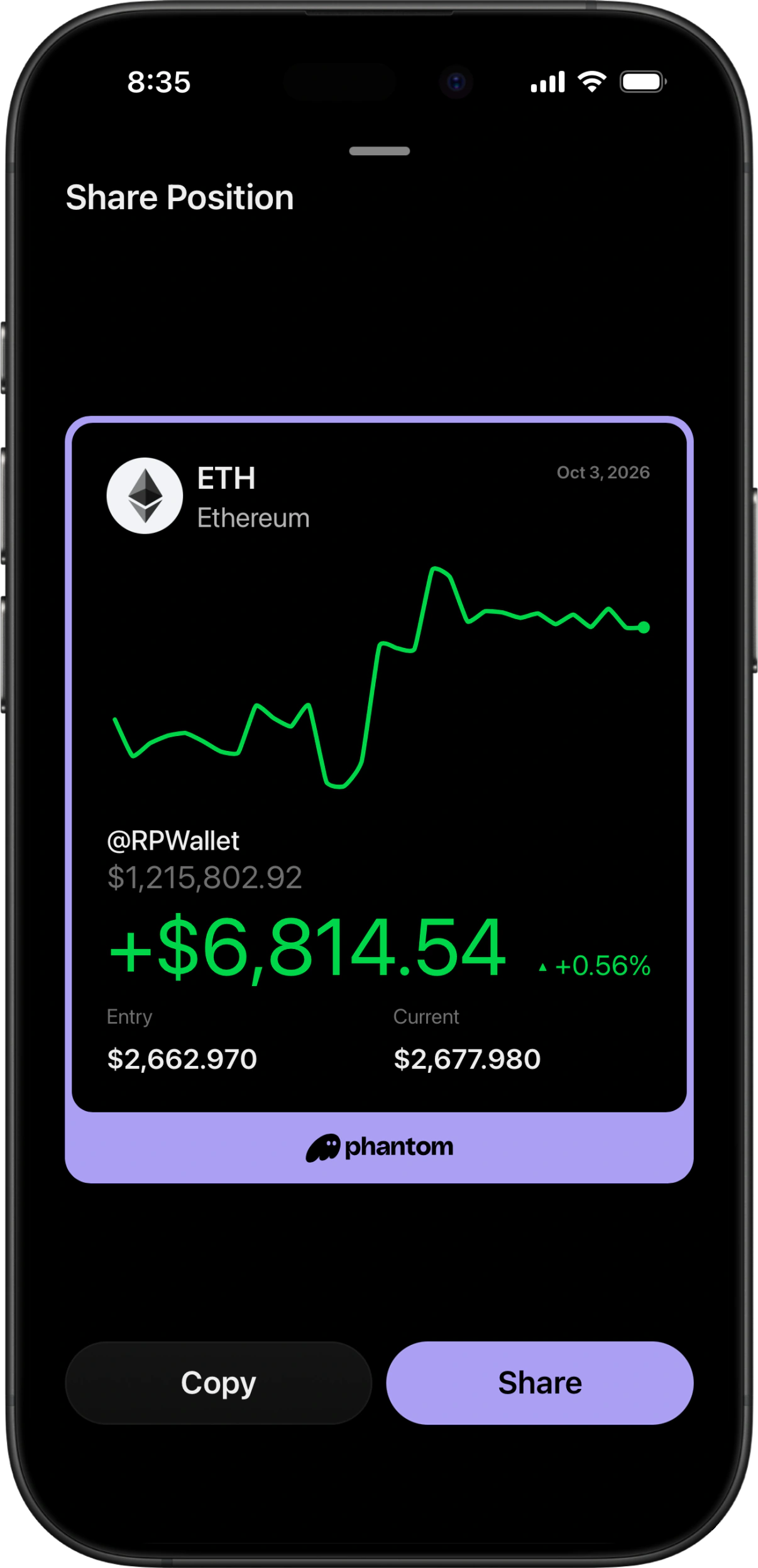
Position card
Share one holding and its return on a card made for a post or a story.
Incoming-transfer alerts
Schedule a simulated incoming transfer so its notification lands while you are recording.
Memecoins in a Phantom-style wallet
Search Manage Tokens by name or symbol to add a memecoin to the simulated portfolio. Once you import it, enter the quantity you want to show on Home.
The token list shows prices below one cent. You can supply a missing logo or open the Trade tab to record a practice buy with a cost basis.
How to add a memecoin to the simulator
Importing and setting the amount are two separate steps.
- Search for the token
Open Manage Tokens and search by name or symbol. Popular tickers are often shared by several projects, so check the full name before importing.
- Import it
Tap Import beside the matching result. The app confirms when the token joins your list.
- Add a logo if needed
If the token has no image, use the upload control on its row to choose a square PNG.
- Set the quantity
Enter the holding in Edit Profile, or buy it in the Trade tab so it arrives with a cost basis.
- Open the token screen
Tap the token on Home to check its chart and position before you record.
What the Trade tab includes
The memecoin market is separate from the balance editor and runs against your simulated balances.
- Trending list
- Trending Solana tokens pulled from a live market feed.
- Standing list
- Names such as WIF, BONK, PEPE, POPCAT and PENGU, so the screen is never empty if the feed is slow.
- Buys and sells
- A buy takes from your simulated balance and adds the token. A sell does the reverse.
- Cost basis and return
- Tokens bought in the Trade tab track what you paid, so the position screen can show a return.
- Watchlist
- Star the coins you want to keep an eye on during a recording.
Tokens with no price
If the price feed has no quote, the token row shows how many you hold and leaves out the dollar value.
If the script calls for an invented coin, give it a fictional name and identify it as such in the video. Keep real assets under their own names.
More Phantom pages
- Phantom Wallet SimulatorSet balances, import tokens and open a practice swap in Activity.
- Try the Phantom balance demoEdit Bitcoin or cash and see the portfolio total change on the home screen.
- Fake Phantom WalletRun it from your phone’s home screen with nothing to download.
- Phantom Wallet Screenshot GeneratorWhich screens to capture and how to keep them consistent.
- Fake Phantom Wallet BalanceSet token quantities and let the total follow live prices.
- Phantom Perps SimulatorLeverage, stop losses and liquidation with simulated USDC.
- Phantom LARP WalletPlan a Solana scene for a skit or roleplay video.
- Phantom Simulator on iPhoneInstall from Safari instead of looking for an IPA file.
- What Is a Phantom Wallet Simulator?Who uses one, and what it can and cannot do.
Included with every pass.
One license unlocks all nine LARP apps.
 LARP Fomo
 LARP Shopify
 LARP Coinbase
 LARP Revolut
 LARP Phantom
 LARP Trust Wallet
 LARP Exodus
 LARP Ledger Live
 LARP Cash App
- ✓ Full access on iOS or Android
- ✓ Custom balances, all screens and features included
- ✓ Priority support
Pricing
Every pass includes all wallets.
7-Day Pass
Short term access
- Full access on iOS or Android
- All apps included (Phantom, Trust, Exodus, Ledger, Coinbase, Fomo, Cash App and Banking App)
- Custom balances, all screens and features included
- 1 device
- Priority support
- Not included: Early access to new wallets
1-Month Pass
Full features unlocked
- Full access on iOS or Android
- All apps included (Phantom, Trust, Exodus, Ledger, Coinbase, Fomo, Cash App and Banking App)
- Custom balances, all screens and features included
- 1 device
- Priority support
- Not included: Early access to new wallets
1-Year Pass
Best value for power users
- Full access on iOS or Android
- All apps included (Phantom, Trust, Exodus, Ledger, Coinbase, Fomo, Cash App and Banking App)
- Custom balances, all screens and features included
- 2 devices
- Priority support
- Not included: Early access to new wallets
- Full access on iOS or Android
- All apps included (Phantom, Trust, Exodus, Ledger, Coinbase, Fomo, Cash App and Banking App)
- Custom balances, all screens and features included
- 3 devices
- Priority support
- Early access to new wallets
What our Telegram members say
Read more reviews in our Telegram channel.
Phantom is crazy close fr. The animations are working too
Telegram Member replied in like 30 seconds and sorted my key. w support
Telegram Member bro how are the animations this smooth wtf? feels like a real app
Telegram Member Key worked immediately, thanks g.
Telegram Member Damn this looks too clean, didn't expect trust to be 1:1 like this. u can use this as a vouch
Telegram Member u cooked on this update bro holy shit phantom and exodus are 1:1
Telegram Member fixed my issue in 2 mins bro, 10/10 support love u guys
Telegram Member like how does a web app feel 100% native with zero frame drops???
Telegram Member Yooo key activated smoothly. Everything works super clean, no issues at all thanks.
Telegram Member legit the only one in this whole telegram space that actually knows what hes doing
Telegram Member bro exodus is perfection holy shit ui is 1:1 down to the font
Telegram Member fast asf, paid and got access right away. appreciate it bro
Telegram Member u the goat bro, animations are butter smooth
Telegram Member The transaction history and balance animations are clean asf, just what I needed
Telegram Member support fast asf too answered my dm instantly
Telegram Member
How to get started.
Get your pass
Choose your pass length and device count at checkout.
Save your license key
Copy it from the payment page once payment is confirmed.
Activate and install
Enter the key in your dashboard. Install a wallet, then set your balance.

Frequently asked questions.
Memecoin Wallet Simulator
Can I show a memecoin that launched yesterday?
Usually, yes. Search for it by name or symbol in Manage Tokens. Very new tokens may not have their metadata listed yet; in that case the token shows a quantity without a dollar value.
Why does my memecoin show no dollar value?
There is no market price for it yet, so the wallet shows the quantity only. That is also how a real wallet displays an unpriced token.
Can I make up my own token?
You can upload your own logo for a token with no image. Do not relabel a real asset as something else. Keep a fictional token clearly fictional in your video.
Are the memecoin trades real?
No. The Trade tab uses live prices, but buys and sells only change balances inside the simulator. Nothing is signed or sent to the Solana network.
Which Phantom features does the memecoin page cover?
Holding and trading memecoins. For setting the balance itself, see the balance editor page. For perpetual futures, see the perps simulator page.
Is RPWallet affiliated with Phantom?
No. RPWallet is an independent simulation tool and is not affiliated with, endorsed by, or connected to Phantom or any other wallet provider or blockchain project. All product names and brands are the property of their respective owners.
Still have a question? Ask on Telegram